
Pricing and Plans FAQ
Click either link below for further details specific to the EasyRoutes product you're using:
EasyRoutes for Shopify
How do driver seats work?
Instead of paying for individual drivers, with EasyRoutes you just pay for a driver seat and can put any driver in your roster into that seat. For example, you could have a plan with two driver seats, but have four drivers in your driver roster. You can easily change which two drivers are active at any given time by assigning the two driver seats to them. If you have a busy delivery weekend, you can add seats for the additional drivers for that weekend, and then remove the seats after you're done with them. We prorate the charges and credits for upgrading and downgrading based on the changes in the number of seats on your plan.
You can add, remove, and switch drivers in a way that is flexible with your business at any time from within EasyRoutes. If you need more active drivers, you’ll need to add more seats to your plan. Learn more in this EasyRoutes help article.
Your monthly EasyRoutes bill will be based on how many driver seats your subscription contains - even if the drivers who occupied those seats have been deactivated. If additional driver seats are only required temporarily (for example, a busy weekend or holiday), be sure to remove those seats from your subscription as soon as they're no longer required. Full details here: How do I manage my driver seats?
How much does each driver seat cost?
Your monthly price is your plan’s per-seat rate multiplied by your number of driver seats. For example, 3 seats cost 3 times your plan’s per-seat rate. To see the current rate for your account's subscription, access your EasyRoutes Settings > Help & Support tab; from the Plan details card, click Manage your plan.
How does billing work for an EasyRoutes plan subscription?
Our plans work as subscription charges on your Shopify store. To learn more about subscription charges on your Shopify store, review this Shopify Help Center article.
You can add or remove the number of driver seats you have active at anytime, and when you apply a change you will need to reconfirm your monthly payment. We prorate the charges and credits for upgrading and downgrading based on the changes in the number of seats on your plan.
Your EasyRoutes billing will be based on how many driver seats your subscription contains - even if the drivers who occupied those seats have been deactivated. If additional driver seats are only required temporarily (for example, a busy weekend or holiday), be sure to remove those seats from your subscription as soon as they're no longer required. Full details here: How do I manage my driver seats?
How does a free trial work?
You can try any of our plans for 14 days by installing EasyRoutes by Roundtrip on the Shopify App Store. Just like all EasyRoutes for Shopify paid plans, our free pricing tier offers the same seamless integration with your Shopify Admin and orders.
If you cancel anytime during your trial you won't be billed. If you continue, your subscription starts when your trial period ends.
Do I need a credit card for the free trial?
No. Your plan is a subscription charge on your Shopify store, so you approve it in Shopify and it’s added to your Shopify bill once the 14-day trial ends - note that, depending on your Shopify billing setup, this might be tied to a credit card on file with Shopify already. You aren’t charged during the trial.
Do my settings carry over when I upgrade to a paid plan?
Yes. When you change plans on the same store or account, your settings, drivers and routes stay in place. Setting up before your store officially launches? Start on the Free plan to get everything ready, then start your 14-day trial of a paid plan closer to your launch date.
How do I manage my active drivers using seats?
You can add, remove, and switch drivers in a way that is flexible with your business at anytime from within EasyRoutes. If you need more active drivers, then you'll need to add more drivers on your plan. Learn more in this EasyRoutes help article.
Is there pay-per-order pricing?
No - paid plans are priced per driver seat and your monthly subscription tier; if you deliver a low volume of orders per month, consider starting on the Free plan as it may be sufficient for your needs.
What can I be charged for?
Your driver seats (billed based on your monthly pricing tier), plus any usage-based SMS charges if you send text notifications; review our current SMS rates for further details. All EasyRoutes plans do not require a contract, and can be cancelled at any time.
How do I change my plan?
You can change your plan at any time in your EasyRoutes settings by following the instructions in this EasyRoutes help article. Any active drivers you have on your current plan will also be changed to the new plan's monthly price. All driver seats on an account are on the same plan - you can’t currently put one seat on a different plan.
Can I pause my plan in the off-season?
Yes. Switch to the Free plan while you’re not delivering. Your data is kept, and you can upgrade again when you’re ready. If you meant to downgrade and forgot, reach out to our support team for further assistance.
Do you offer nonprofit pricing, trial extensions, or development store access?
We'd be happy to learn more about your circumstances - please reach out to our support team and let us know what you're looking for.
How much do SMS messages cost?
SMS messaging rates are determined by the country of the recipient (view usage-based SMS rates).
What currency are the subscription plans in?
All listed prices are in USD.
What does the Enterprise subscription tier add?
Everything in Premium, plus a dedicated account manager, priority support during business hours, and personalized onboarding, including help setting up your notifications. Enterprise is designed for larger delivery teams. Contact us to find out more.
EasyRoutes for Web
How do driver seats work?
Instead of paying for individual drivers, with EasyRoutes you just pay for a driver seat and can put any driver in your roster into that seat. For example, you could have a plan with two driver seats, but have four drivers in your driver roster. You can easily change which two drivers are active at any given time by assigning the two driver seats to them. If you have a busy delivery weekend, you can add seats for the additional drivers for that weekend, and then remove the seats after you're done with them. We prorate the charges and credits for upgrading and downgrading based on the changes in the number of seats on your plan.
You can add, remove, and switch drivers in a way that is flexible with your business at any time from within EasyRoutes. If you need more active drivers, you’ll need to add more seats to your plan. Learn more in this EasyRoutes help article.
Your monthly EasyRoutes bill will be based on how many driver seats your subscription contains - even if the drivers who occupied those seats have been deactivated. If additional driver seats are only required temporarily (for example, a busy weekend or holiday), be sure to remove those seats from your subscription as soon as they're no longer required. Full details here: How do I manage my driver seats?
How much does each driver seat cost?
Your monthly price is your plan’s per-seat rate multiplied by your number of driver seats. For example, 3 seats cost 3 times your plan’s per-seat rate. To see the current rate for your account's subscription, access your EasyRoutes Settings > Help & Support tab; from the Plan details card, click Manage your plan.
How does billing work for an EasyRoutes plan subscription?
Our plans work as monthly subscription charges processed via the Stripe billing platform.
You can add or remove the number of driver seats you have active at anytime, and when you apply a change you will need to reconfirm your monthly payment. We prorate the charges and credits for upgrading and downgrading based on the changes in the number of seats on your plan.
Your EasyRoutes billing will be based on how many driver seats your subscription contains - even if the drivers who occupied those seats have been deactivated. If additional driver seats are only required temporarily (for example, a busy weekend or holiday), be sure to remove those seats from your subscription as soon as they're no longer required. Full details here: How do I manage my driver seats?
How does a free trial work?
You can try any of our plans for 14 days by signing up for EasyRoutes for Web here.
If you cancel anytime during your trial you won't be billed. If you continue, your subscription starts when your trial period ends.
Do I need a credit card for the free trial?
No. You can start the 14-day trial without a credit card on file. Add a payment method before the trial ends to keep your plan; if you don’t, your subscription is paused.
Do my settings carry over when I upgrade to a paid plan?
Yes. When you change plans on the same store or account, your settings, drivers and routes stay in place.
How do I manage my active drivers using seats?
You can add, remove, and switch drivers in a way that is flexible with your business at anytime from within EasyRoutes. If you need more active drivers, then you'll need to add more drivers on your plan. Learn more in this EasyRoutes help article.
Is there pay-per-order pricing?
No - paid plans are priced per driver seat and your monthly subscription tier.
What can I be charged for?
Your driver seats (billed based on your monthly pricing tier), plus any usage-based SMS charges if you send text notifications; review our current SMS rates for further details. All EasyRoutes plans do not require a contract, and can be cancelled at any time.
How do I change my plan?
You can change your plan at any time in your EasyRoutes settings by following the instructions in this EasyRoutes help article. Any active drivers you have on your current plan will also be changed to the new plan's monthly price. All driver seats on an account are on the same plan - you can’t currently put one seat on a different plan.
Do you offer nonprofit pricing or trial extensions?
We'd be happy to learn more about your circumstances - please reach out to our support team and let us know what you're looking for.
How much do SMS messages cost?
SMS messaging rates are determined by the country of the recipient (view usage-based SMS rates).
What currency are the subscription plans in?
All listed prices are in USD.
What does the Enterprise subscription tier add?
Everything in Premium, plus a dedicated account manager, priority support during business hours, and personalized onboarding, including help setting up your notifications. Enterprise is designed for larger delivery teams. Contact us to find out more.
How do I update the billing contact for my account?
- Login to your EasyRoutes account via this link
- From the sidebar navigation menu, click the Settings link, and access the Help & Support tab
- From the Plan Details card, click the Go to billing portal button
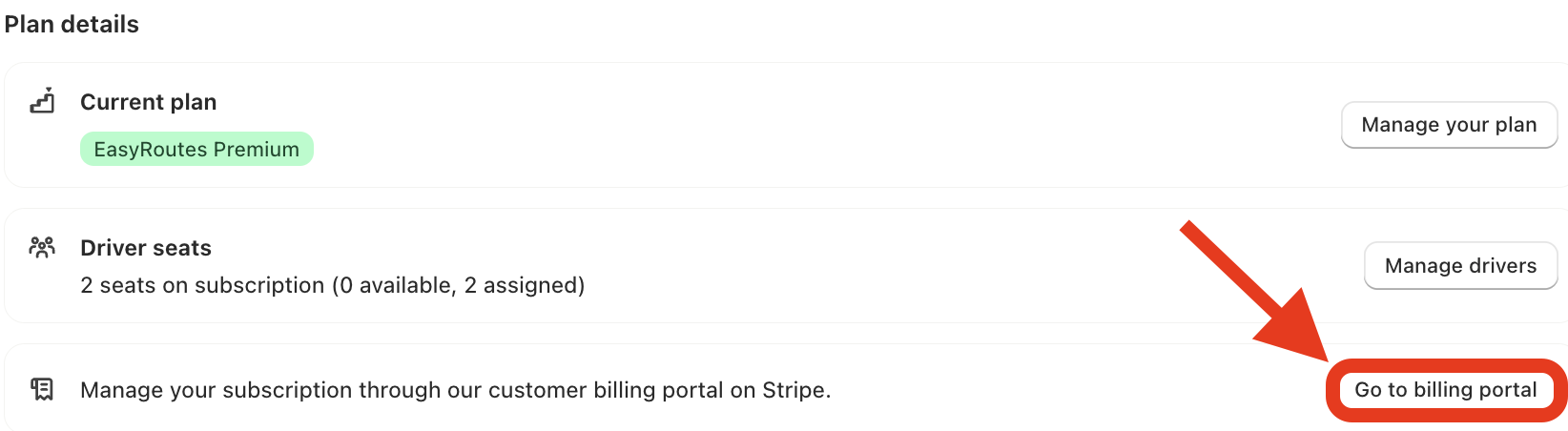
- On the billing portal scroll down to the Billing Information section
- Click the Update information link and make any desired changes

- Click Save to update your billing settings