
How do I use Buunto with EasyRoutes?

EasyRoutes is integrated with Buunto – Delivery Date Picker & Shopify
😤 Take the pain out of manual planning
🗓️ Create scheduled routes in seconds
How to optimize delivery routes based on Delivery Dates and Time Windows from Buunto

Ensure the Time window and Delivery date columns are enabled (highlighted below); click the Done button when complete:

Tip: By default, Buunto stores data with labels that are automatically recognized by EasyRoutes - "Delivery Date" and "Delivery Time". If, after enabling the columns as described above, you're not seeing dates and/or times listed in either column, it's possible these variables are being stored under a different label or with a different format (for example, UK vs. US date/time formatting) than EasyRoutes is expecting.
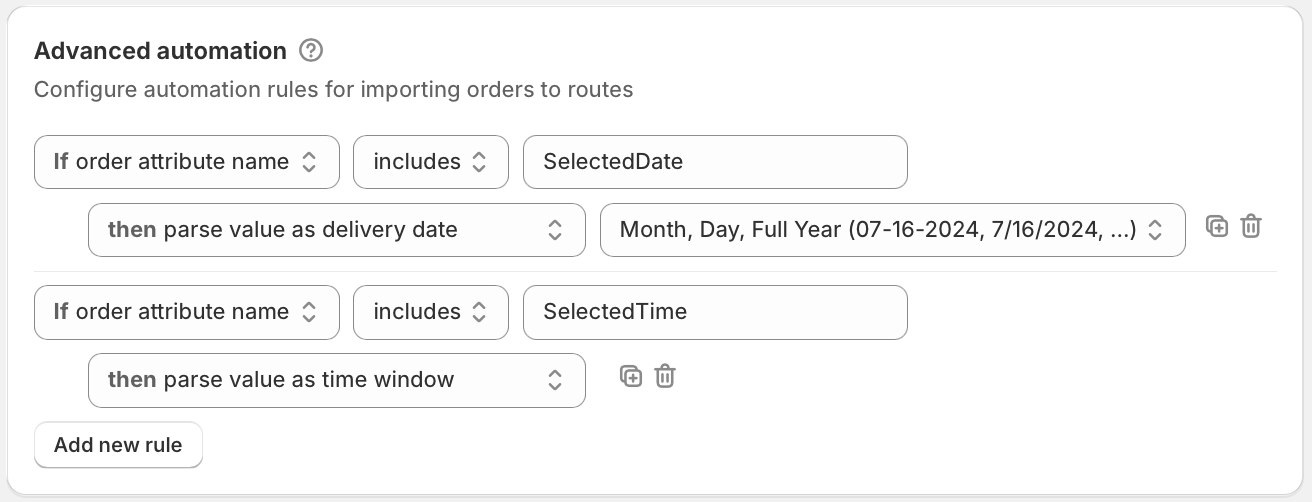
To ensure alternately formatted dates/times are recognized by EasyRoutes, we recommend creating order automation rules to define how these values should be parsed from your EasyRoutes Settings > Automations tab, within the Advanced automation section.
For instance, when created as in the example shown below, dates/times stored under "SelectedDate" and "SelectedTime", with dates formatted as "MM-DD-YYYY" will now be processed properly for further use in EasyRoutes:
For full details on how order automation rules work, see the support article for this feature.
To view tags and attributes as columns for your orders:
- From your EasyRoutes Orders page, click the Configure table columns button found below your currently active Route Options (highlighted below):
- Scroll down to the bottom section of the dialog that appears. From here:
- Enable Order tags to display all order tags in a single column for each order.
- Enable Include customer tags to include applicable customer tags in this same column for each order.
- Enable Attributes to display all attributes in a single column for each order.
- Enable Attribute columns individually to display specific order attributes as standalone columns for each order:
- Enable Order tags to display all order tags in a single column for each order.

- Click the Done button once all required tags/attributes have been enabled - the Orders page will update to display selected columns.
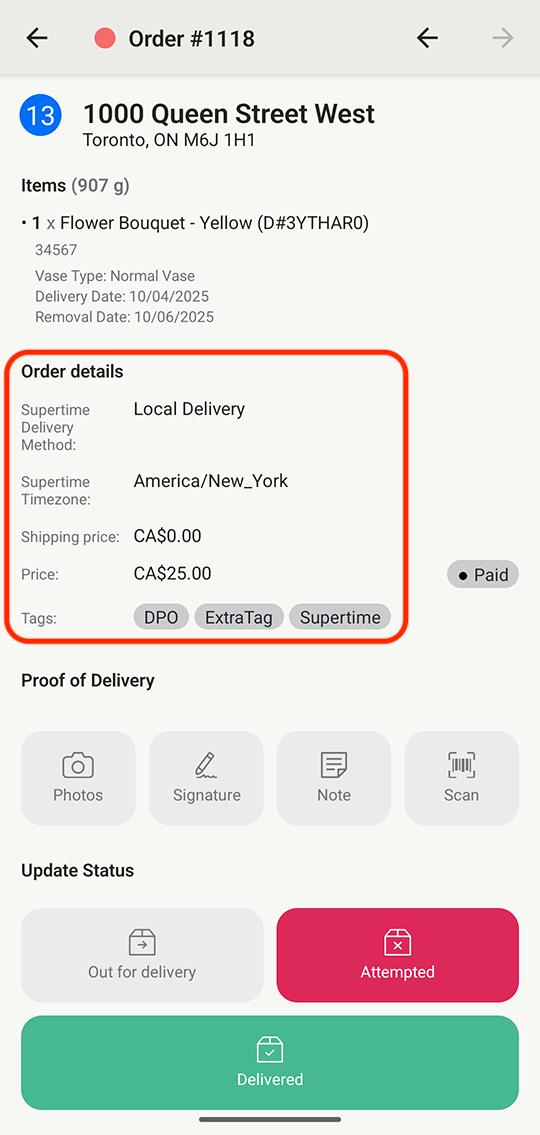
Additionally, to show Buunto attributes to your drivers - you will need to enable showing the attributes column in your Route display options. This will also affect what gets shown for each stop on the driver app.
To view Order tags and Attributes inline for your orders, from your EasyRoutes Settings > Routes tab, ensure these two checkboxes are enabled from the Route display options section:

Once enabled, Order tags and Attributes will display as shown below for each stop within the mobile app:
About Buunto – Delivery Date Picker
Managing local deliveries can get complicated fast. Customers expect orders to arrive on time, and they want to choose a delivery time that works for them. At the same time, merchants need a simple way to organize orders and plan efficient routes.
Buunto – Delivery Date Picker lets customers select a delivery or pickup date and time before they check out. On the merchant side, you stay in control with features like:
- Order cut-off and preparation times
- Holiday and unavailable dates
- Order limits by day, product, or collection
- Multiple pickup locations
- Delivery surcharges
- Multi-language and multi-currency support
- Google Calendar sync
- Custom styling to match your store
- A developer API for custom integrations